- Why Self-Hosted Cloud Security Needs Design First
- The Infrastructure: Three Devices, Three Rules
- Network Architecture: Segmentation in a Small LAN
- Self-Hosted Cloud Security Practices Applied
- Why I Split It This Way
- From Lab Notes to Real Incidents
- Build Your Own Self-Hosted Cloud Security Lab
- Closing Notes: Self-Hosted Cloud Security Is About Decisions
Self-hosted cloud security is not about running a server in your closet. It is about controlling your data, your network, and your credentials. Most people store their photos, documents, and media on someone else’s servers. That is convenient until it is not: a data breach, a service shutdown, or a pricing change you cannot negotiate away. Running your own cloud is technically possible, but the gap between “possible” and “secure” is where most hobby projects fall apart.
This self-hosted cloud security lab is a deliberately small, fully controlled environment built on Linux servers and Raspberry Pi devices. The goal was to practise what real security operations teams do every day: isolate services, enforce encryption, control network traffic, and never store credentials where they do not belong.
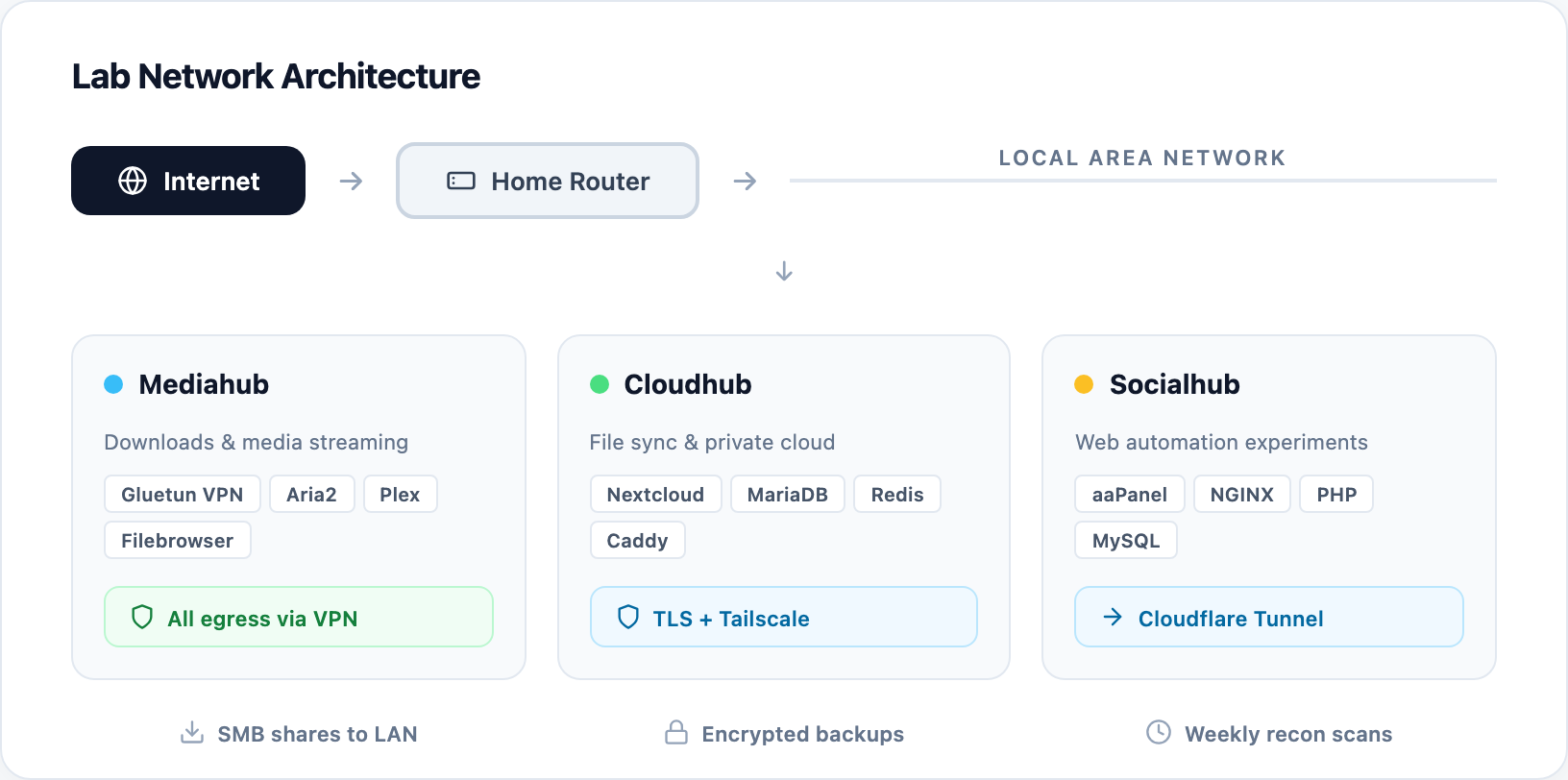
The result is three independent nodes that make up this self-hosted cloud security stack. They handle media, file sync, and web automation, each with its own security boundaries and no single point of failure. Everything is documented, nothing is committed with real passwords, and every configuration file is a template ready to be customised.
Quick Overview
The Infrastructure
Three-Node Lab
A self-hosted cloud security lab with Mediahub, Cloudhub, and Socialhub on Linux and Raspberry Pi, each with dedicated roles and network boundaries.
VPN Egress Control
All outbound download traffic routed through a VPN container. The host IP never touches the external request.
HTTPS Everywhere
Caddy reverse proxy with TLS termination and HSTS. Cloudflare Tunnel for remote access without open ports.
Hardened SMB
Samba shares with mandatory signing, encryption, and restricted user access. No guest logins.
Template-First
All configs are .example files with placeholders. Real secrets are injected at deploy time, never committed.
Why Self-Hosted Cloud Security Needs Design First
Home labs often start as convenience projects and end as liability exercises. A Plex server here, a file share there, and suddenly your LAN has half a dozen services running with default passwords and no logging. The attack surface grows silently because each new container is “just for personal use.”
The difference between a toy and a self-hosted cloud security setup is the same as in any production environment: documented boundaries, least-privilege access, and the assumption that compromise will happen. This lab was built with that mindset from the first docker-compose file.
The Infrastructure: Three Devices, Three Rules
The lab splits work across three nodes so that a breach in one does not automatically expose the others. Each node is a separate Linux device on the same LAN, managed independently.
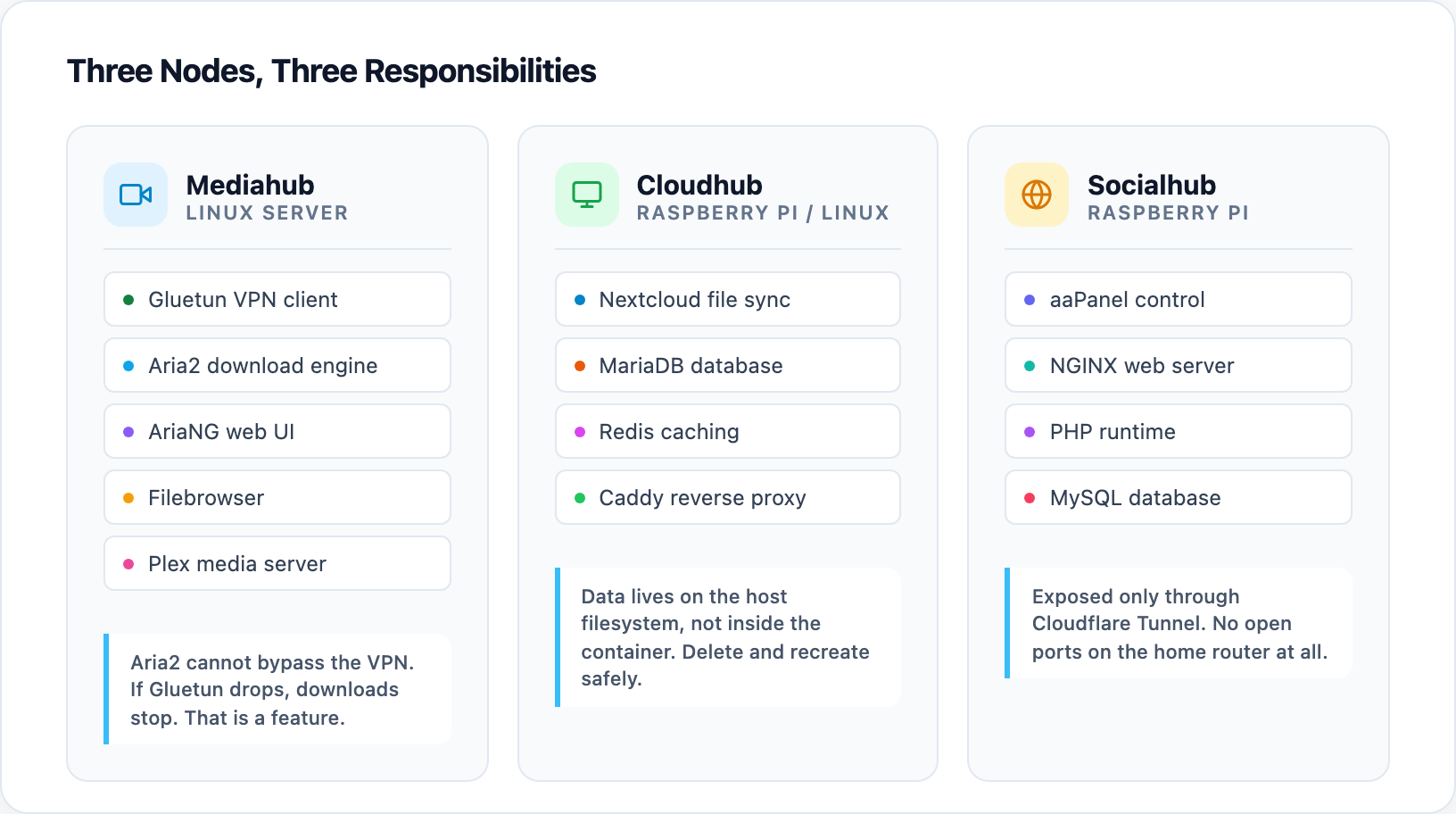
Each node in this self-hosted cloud security architecture has a single responsibility. Mediahub is the download and media node. It runs a Docker stack with five services:
- Gluetun – a VPN client container that forces all outbound traffic from other containers through an encrypted tunnel. The host IP is never visible to the destination.
- Aria2 – a lightweight download engine. Its outbound requests are routed exclusively through Gluetun.
- AriaNG – the web interface for managing downloads, accessible only inside the LAN.
- Filebrowser – a web file manager for the shared Media directory, used by Plex and the SMB share alike.
- Plex – a media server that streams from the same directory.
The key insight is that Aria2 cannot accidentally leak the home IP because it literally has no network path that bypasses the VPN container. If Gluetun goes down, Aria2 stops downloading. That is a feature, not a bug.
Cloudhub is the private file sync and collaboration node in this self-hosted cloud security lab. It runs a full Nextcloud stack:
- Nextcloud – the file sync and collaboration platform.
- MariaDB – the database, isolated in its own container.
- Redis – in-memory caching to speed up file operations.
- Caddy – a reverse proxy that handles HTTPS termination and HSTS headers.
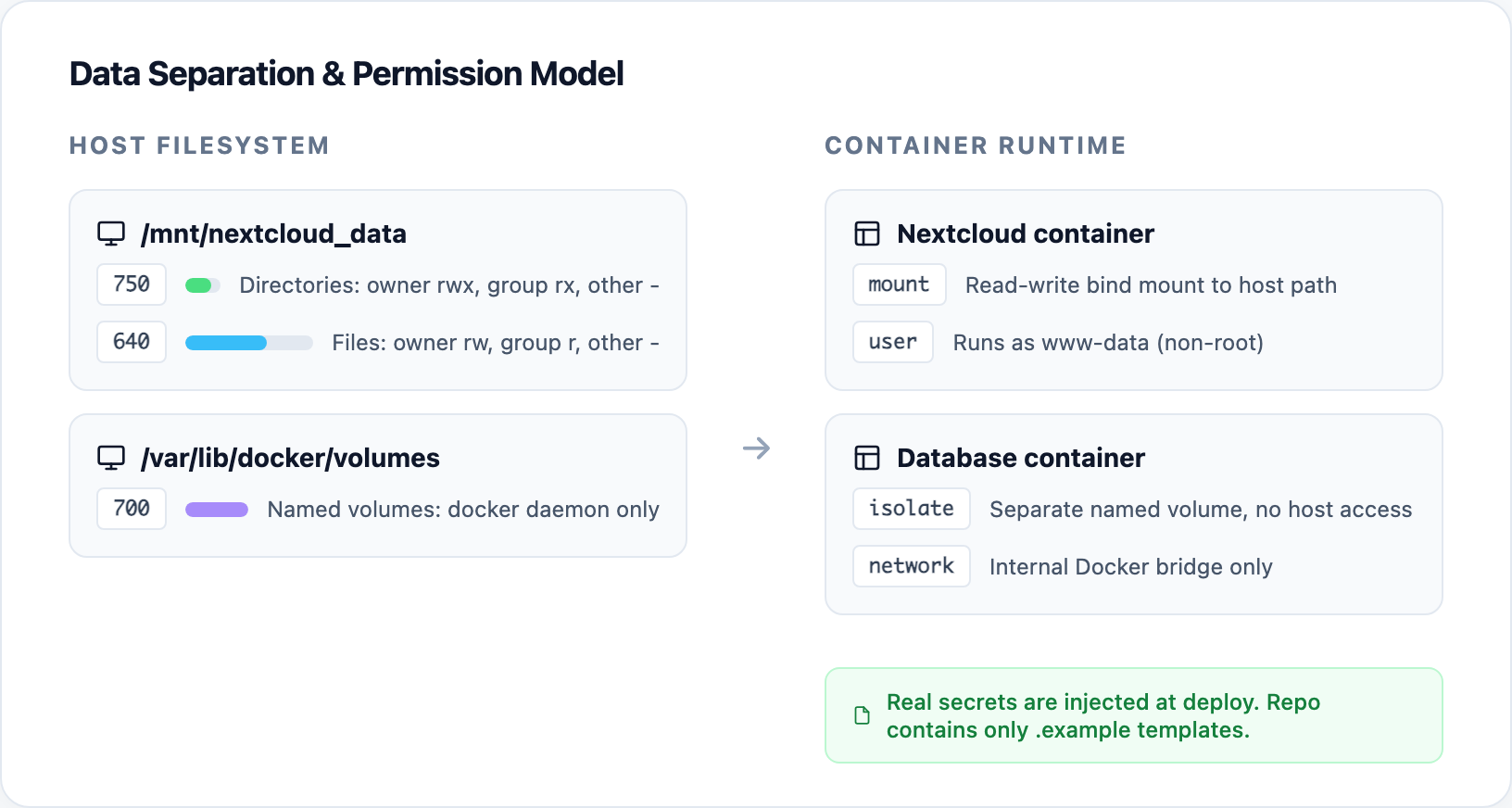
User data is stored on a dedicated host path mounted into the container, not inside the ephemeral container layer. If the Nextcloud container is deleted and recreated, the files survive. The data directory is owned by the web service account with directory permissions of 750 and file permissions of 640, meaning only the service user and root can read the contents at the host level.
Socialhub is the experimental automation node, completing the self-hosted cloud security stack. It runs web applications managed through aaPanel, a hosting control panel that handles NGINX, PHP, and database services. A Cloudflare Tunnel exposes selected sites to the internet without opening ports on the router. This node is intentionally separate from Cloudhub because it experiments with public-facing workflows, while Cloudhub stores sensitive personal data.
Network Architecture: Segmentation in a Small LAN
The three nodes in this self-hosted cloud security lab share a single router but do not trust each other. Each node exposes only the ports it needs, and public services never face the open internet directly.
Mediahub enforces VPN egress for all downloads. Cloudhub relies on Caddy for TLS and can operate behind Cloudflare Tunnel or Tailscale for remote access. Socialhub is reachable only through Cloudflare Tunnel, meaning there are no forwarded ports on the home router at all. The tunnel creates an outbound connection to Cloudflare’s edge, and external requests arrive through that existing tunnel. An attacker scanning the home IP would find nothing to attack because the services have no public ports.
Self-Hosted Cloud Security Practices Applied
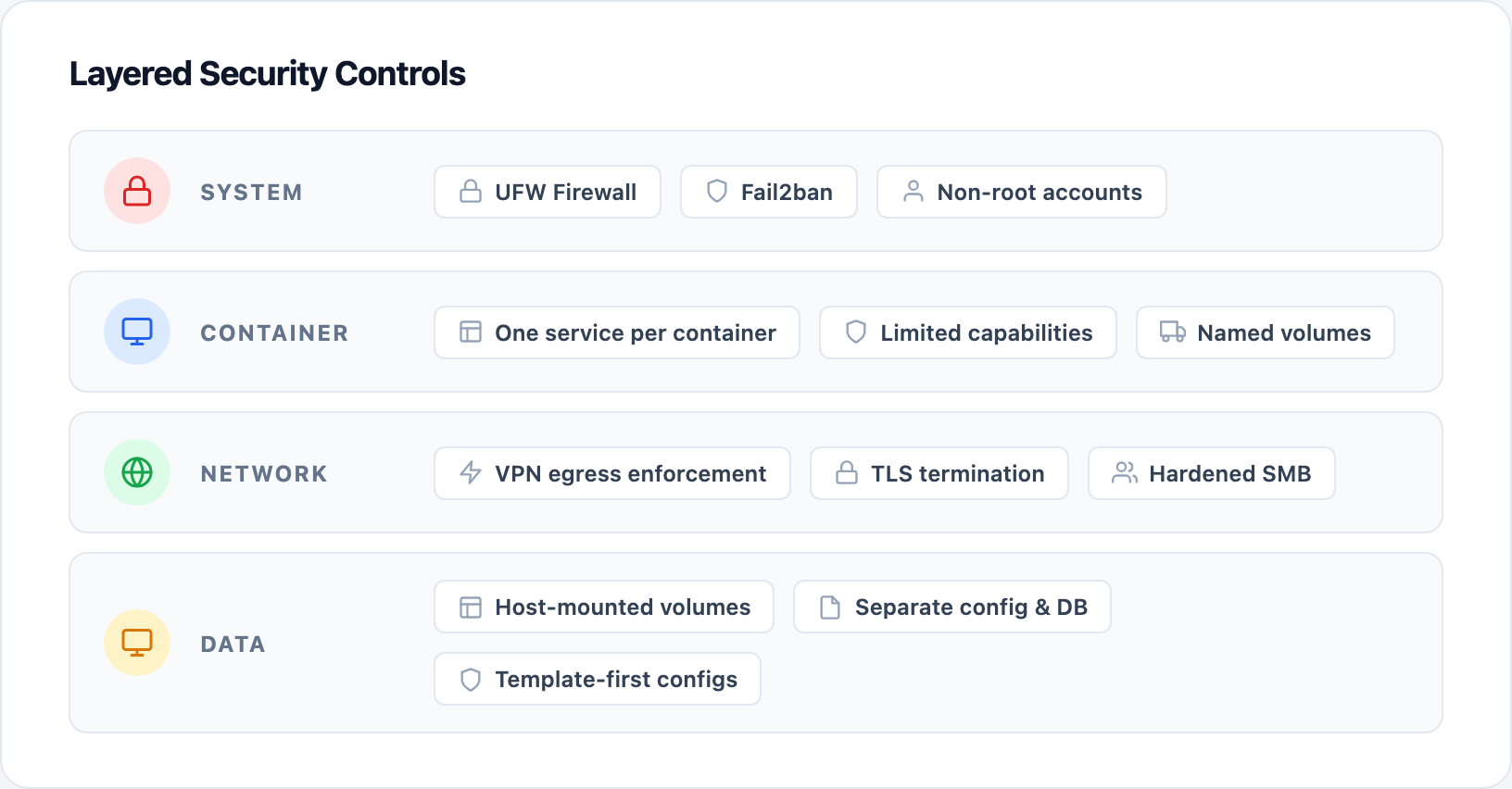
The self-hosted cloud security hardening is deliberately low-tech because that is what works at small scale:
System level
- UFW firewall on each node, allowing only SSH, HTTP/HTTPS, and service-specific ports.
- Fail2ban protecting SSH and basic web access from brute-force attempts.
- Non-root service accounts with strict ownership of data folders.
Container level
- Each service runs in its own container. The database cannot reach the file manager.
- Containers run with limited capabilities. Gluetun gets NET_ADMIN because it needs to manage network interfaces; Filebrowser does not.
- Named volumes for persistent data so containers can be replaced without losing files.
Network level
- VPN egress enforcement for Aria2 via Gluetun.
- Reverse proxy terminating TLS for Nextcloud.
- Hardened Samba with minimum SMB2 protocol, mandatory signing, encryption enabled, and no guest access.
Data level
- Nextcloud data on a dedicated host path with restricted permissions (directories 750, files 640).
- Separate volumes for application config and database to simplify backup and restore.
- All credentials, API keys, and secrets replaced with placeholders in the repository. Real values are injected at deployment time.
Why I Split It This Way
1. Template-first configuration. Every docker-compose.yml and config file is an .example template. This means anyone can clone the repository without risk: there are no real passwords, VPN accounts, or tunnel IDs to leak. The deploy step is a deliberate copy-and-customise operation, which forces a security review before anything goes live.
2. Host-mounted data volumes. Containers are designed to be replaceable, not precious. User files live on the host filesystem under dedicated paths like /mnt/nextcloud_data, mounted into the container at runtime. If a container image is corrupted or compromised, delete it and recreate it. The data survives because it was never inside the container.
3. Separate nodes for separate risk profiles. Cloudhub stores personal documents. Socialhub experiments with public web apps. Mediahub downloads content from the internet. Putting all three on the same machine would mean that a compromise in the download path could expose personal files. The physical separation, even within the same LAN, creates a meaningful boundary.
From Lab Notes to Real Incidents
A security operations team does not just install tools. It decides what happens when a container crashes, when a certificate expires, when someone tries to log in with a stolen password, or when a new device appears on the network. This self-hosted cloud security lab is a practise ground for all of those scenarios.
The network baseline reconnaissance project scans this same LAN every week and reports new devices or vulnerable software. That feedback loop means the lab is not static: if someone adds an unsecured IoT device, the recon job catches it. If a certificate is about to expire, the health check flags it. The lab defends itself by being observable.
Build Your Own Self-Hosted Cloud Security Lab
The full self-hosted cloud security repository is available on GitHub at local-cloud-sec-ops-lab. Each node has its own directory with a README, example configs, and a hardening checklist. You can replicate one node or all three, on Raspberry Pi devices, old laptops, or cloud VMs.
Quick-start commands
git clone https://github.com/oswaldo-reategui/local-cloud-sec-ops-lab – clone the repository
cp docker-compose.yml.example docker-compose.yml – create a real config from the template
docker compose up -d – deploy the stack
Remember to replace every placeholder with your own values: VPN credentials, database passwords, domain names, and volume paths. Then review the firewall rules and file permissions before exposing anything to the internet.
Closing Notes: Self-Hosted Cloud Security Is About Decisions
The real value of this lab is not the services it runs. Any guide can install Nextcloud or Plex in ten minutes. The value is in the decisions that prevent those services from becoming liabilities: the VPN container that silently enforces egress, the permission model that limits host-level access, the tunnel that removes the need for open ports, and the template discipline that keeps secrets out of version control.
These are the same decisions that matter in a corporate cloud environment, just at a smaller scale. A security operations engineer who can explain why a container should not run as root, why a database should live on a separate volume, and why a reverse proxy should terminate TLS before the application sees the request, is someone who understands defence in depth. This self-hosted cloud security lab is proof that those skills were practised deliberately, not copied from a tutorial.